
Prompt Engineering & AI Automation · Career skills · Full course
Free prompt engineering and AI automation course
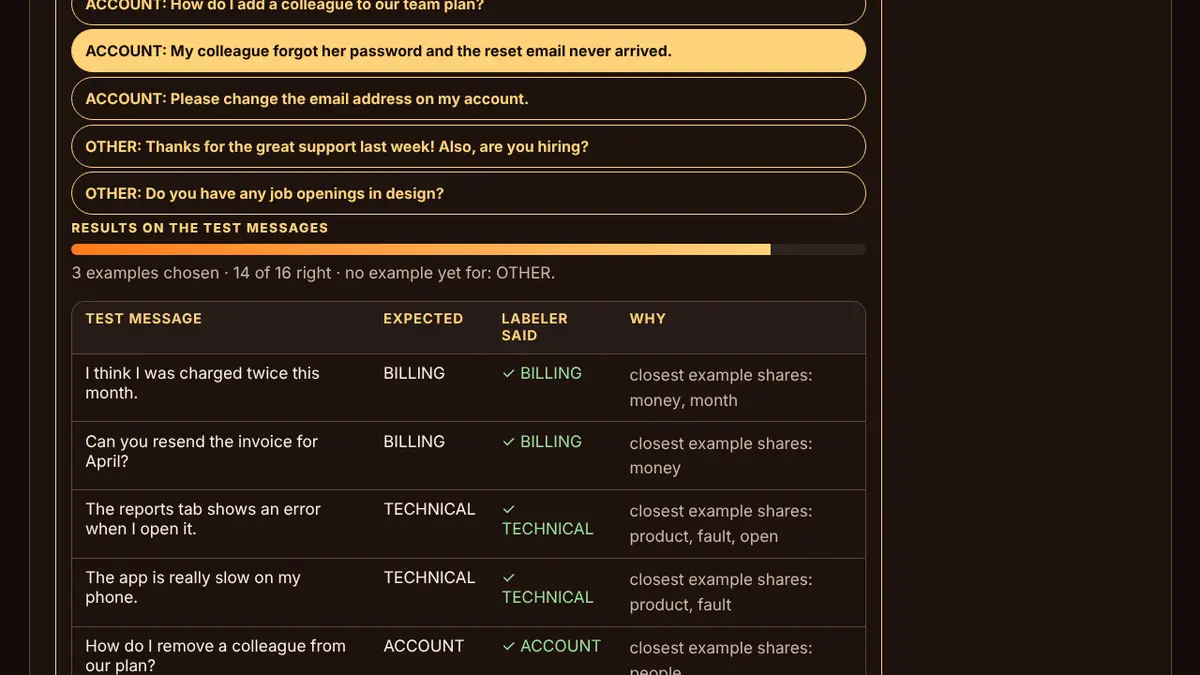
Prompt Engineering & AI Automation is a free, full career course on getting reliable work out of AI models. It has 8 units and 32 lessons: how models read prompts, tokens and temperature, the parts of a professional prompt, keeping instructions apart from data, testing and improving prompts, structured JSON output and validation, few-shot examples, prompt chains with gates and human review, evaluating outputs against test cases, and automating office tasks responsibly, including when not to.
Every lesson explains one idea in plain words, works a real example step by step, then asks two or three questions that make you use it. Wrong answers explain why and come back in Review until they stick. There are 144 practice and quiz questions in all, plus five hands-on labs: prompt rubric checker, JSON output validator, few-shot example picker, workflow chain builder and eval harness.
Pass every unit quiz with 80% or more and finish the final project, designing, testing and documenting an automation for a real office task, to earn a printable certificate of completion. Progress is saved only in this browser on this device, with nothing to sign up for.
Every lesson is free: no ads, no lives and no paywall.
What you'll learn
- What a model can and cannot see, tokens and the context window, why the same prompt gives different answers, and how system prompts and roles work.
- The parts of a professional prompt, specific and measurable instructions, keeping instructions apart from data, and giving the model a safe way out.
- The draft-test-diagnose loop, naming the kind of failure, breaking hard tasks into steps, and versioning prompts so fixes do not break old cases.
- Why programs need structure, JSON rules, describing the exact shape with a schema, validating every output, and extraction that is clean enough to use.
- Zero-shot and few-shot prompts, choosing examples that cover the hard cases, the ways examples backfire, and laying them out cleanly and privately.
- Splitting work into testable steps, deciding what the model does and what code does, adding gates and human review, and handling errors that compound.
- Building a test set with expected outputs, choosing how to grade, reading results by category and severity, and keeping evaluation going after launch.
- Choosing tasks worth automating, four common office automations end to end, the ways automations fail, and when a person must stay in charge.
All 8 units
- Unit 1How models read promptsA prompt is all the model knows · Tokens and the context window · Same prompt, different answers · System prompts and roles
- Unit 2Writing prompts that workThe anatomy of a professional prompt · Specific, measurable and positive · Keep instructions and data apart · Give the model a way out
- Unit 3Testing and improving promptsThe improvement loop · Diagnosing bad outputs · Break it down and let it think · Versions, regressions and a prompt library
- Unit 4Structured output: JSONWhy programs need structure · Describe the exact shape · Validate every output · Extraction in practice
- Unit 5Few-shot examplesShow, do not just tell · Choosing examples that teach · When examples backfire · Formatting examples well
- Unit 6Prompt chains and workflowsOne giant prompt or a chain? · Designing the steps · Gates, routes and human review · When chains fail
- Unit 7Evaluating outputsBuild a test set · Ways to grade outputs · Reading results and choosing a version · Evals after launch
- Unit 8Automating office work responsiblyChoosing what to automate · Four office automations, end to end · How automations fail · When not to automate
Questions
Is Prompt Engineering & AI Automation really free?
Yes. Every lesson is free: no ads, no lives and no paywall. There is no account to make, and your progress is saved in your own browser.
Do I need to know how to code?
No. The course works with plain-language prompts, JSON and workflow design. Code appears only as short, explained examples, and the automation recipes can be built with no-code tools.
Does it use a real AI model?
The five labs run in your browser and call no AI service: a rubric checker for your prompts, a real JSON validator, a few-shot example picker, a workflow chain builder and an eval harness. Where a lab shows model output, it is a simulation or a written example, and the lab says so.
Is the certificate an industry certification?
No. It shows you completed every lesson, passed every unit quiz and finished the project of a free Forge course. The project itself, a tested automation design, is the stronger evidence for an employer.