
Code Academy · Beginner
Free coding lessons: HTML, CSS and JavaScript
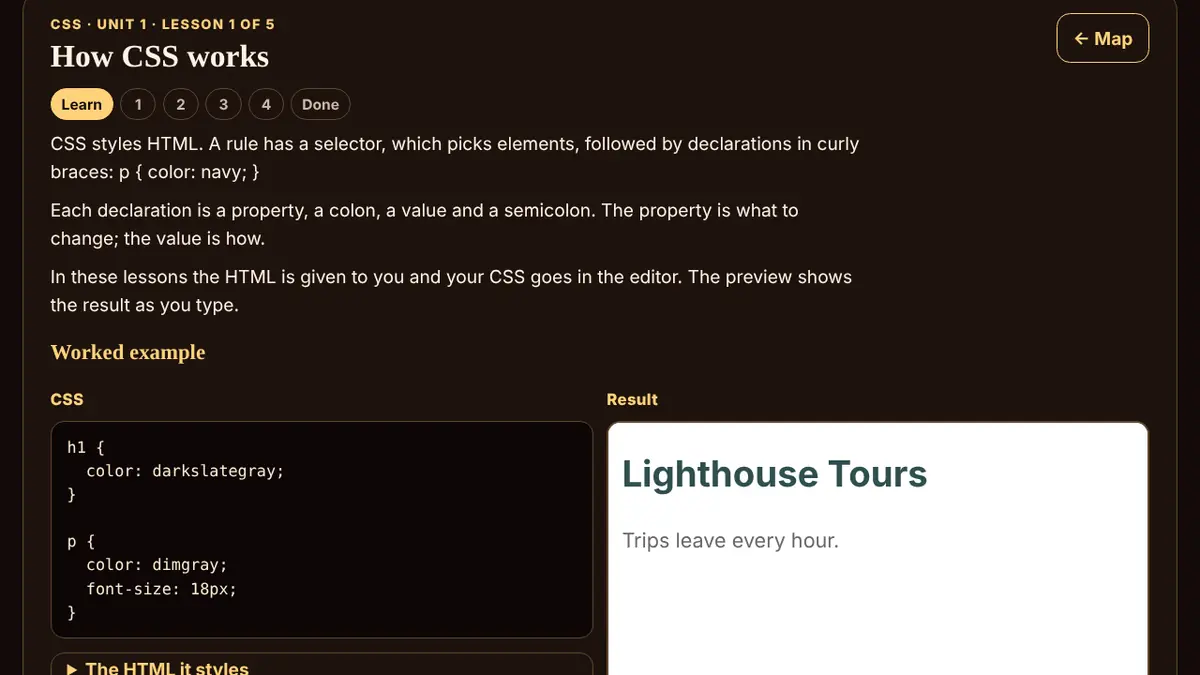
Code Academy teaches HTML, CSS and JavaScript from zero, for people who have never written code. It has 3 tracks, 9 units and 48 short lessons: HTML (structure: headings, text, lists, links, images and forms), CSS (style: color, type, spacing and layouts that fit any screen) and JavaScript (logic: variables, decisions, functions, loops and data).
Each lesson explains one idea in plain words, shows a worked example and then gives you real code to read, fix and write, with feedback that names the exact mistake. Every unit ends with a checkpoint quiz (pass with 80%), and the projects (“Project: your profile card”, “Project: style an event page”, “Mini project: tip calculator” and “Final project: to-do list logic”) bring the pieces together.
Your JavaScript runs in a sealed sandbox, a separate frame with no network, stopped after 1.5 seconds. HTML and CSS show in a preview that cannot run scripts or load outside files. Progress is saved only in this browser on this device, with nothing to sign up for.
Every lesson is free: no ads, no lives and no paywall.
What you'll learn
- HTML: Write elements, headings, paragraphs, emphasis, lists and links.
- HTML: Add images with good alt text, nest elements and build a full page.
- HTML: Show data in tables, build accessible forms and finish your first project.
- CSS: Write rules with selectors, colors, fonts and units.
- CSS: Control padding, borders, margins, width and which rule wins.
- CSS: Build rows, centered layouts, grids and pages that adapt to the screen.
- JavaScript: Print output, store values, do math, work with text and compare.
- JavaScript: Choose with if, reuse code with functions and repeat with loops.
- JavaScript: Use arrays, objects, map and filter, read errors and build to-do logic.
All 48 lessons
HTML · Unit 1: Your first web page
Write elements, headings, paragraphs, emphasis, lists and links.
- Lesson 1Tags and elements5 min · 4 exercises
- Lesson 2Headings and paragraphs6 min · 4 exercises
- Lesson 3Strong and emphasis5 min · 4 exercises
- Lesson 4Lists6 min · 4 exercises
- Lesson 5Links6 min · 4 exercises
HTML · Unit 2: Images and page structure
Add images with good alt text, nest elements and build a full page.
- Lesson 1Images and alt text6 min · 4 exercises
- Lesson 2Nesting and indentation6 min · 4 exercises
- Lesson 3Page sections7 min · 4 exercises
- Lesson 4Class and id6 min · 4 exercises
- Lesson 5A complete page7 min · 4 exercises
HTML · Unit 3: Tables, forms and a profile card
Show data in tables, build accessible forms and finish your first project.
- Lesson 1Tables7 min · 4 exercises
- Lesson 2Forms: labels and inputs7 min · 4 exercises
- Lesson 3Input types6 min · 4 exercises
- Lesson 4Buttons and choices6 min · 4 exercises
- Lesson 5Project: your profile cardProject · 12 min · 4 exercises
CSS · Unit 1: Styling basics
Write rules with selectors, colors, fonts and units.
- Lesson 1How CSS works6 min · 4 exercises
- Lesson 2Class and id selectors6 min · 4 exercises
- Lesson 3Colors and contrast7 min · 4 exercises
- Lesson 4Fonts and text6 min · 4 exercises
- Lesson 5Units: px, rem and %6 min · 4 exercises
CSS · Unit 2: The box model
Control padding, borders, margins, width and which rule wins.
- Lesson 1Padding, border and margin7 min · 4 exercises
- Lesson 2box-sizing: border-box6 min · 4 exercises
- Lesson 3Width, max-width and centering6 min · 4 exercises
- Lesson 4Rounded corners and shadows5 min · 4 exercises
- Lesson 5The cascade and specificity8 min · 4 exercises
CSS · Unit 3: Layout with flexbox and grid
Build rows, centered layouts, grids and pages that adapt to the screen.
- Lesson 1Flexbox: rows and gap7 min · 4 exercises
- Lesson 2Flexbox alignment7 min · 4 exercises
- Lesson 3Wrapping and flexible sizes7 min · 4 exercises
- Lesson 4CSS grid7 min · 4 exercises
- Lesson 5Responsive design with media queries8 min · 4 exercises
- Lesson 6Project: style an event pageProject · 15 min · 4 exercises
JavaScript · Unit 1: JavaScript basics
Print output, store values, do math, work with text and compare.
- Lesson 1Your first program5 min · 4 exercises
- Lesson 2Variables: let and const7 min · 4 exercises
- Lesson 3Numbers and math6 min · 4 exercises
- Lesson 4Strings and template literals7 min · 4 exercises
- Lesson 5Booleans and comparisons7 min · 4 exercises
JavaScript · Unit 2: Decisions, functions and loops
Choose with if, reuse code with functions and repeat with loops.
- Lesson 1if and else7 min · 4 exercises
- Lesson 2Functions and return8 min · 4 exercises
- Lesson 3Defaults and arrow functions7 min · 4 exercises
- Lesson 4for loops8 min · 4 exercises
- Lesson 5while loops and infinite loops7 min · 4 exercises
- Lesson 6Mini project: tip calculatorProject · 12 min · 4 exercises
JavaScript · Unit 3: Working with data
Use arrays, objects, map and filter, read errors and build to-do logic.
Questions
Is Code Academy really free?
Yes. Every lesson is free: no ads, no lives and no paywall. There is no account to make, and your progress is saved in your own browser.
Do I need to know anything first?
No. The course starts from zero: the first lesson explains what a tag is.
Do I need to install anything?
No. You write and run code right in the lesson. JavaScript runs in a sealed sandbox with no network and is stopped after 1.5 seconds; HTML and CSS show in a preview that cannot run scripts.
Is there a certificate?
No. The lessons are Forge originals for beginners and there is no certificate.
Where is my progress saved?
Only in this browser on this device. You can download a backup and load it in another browser.