Ad-Free KenKen
Looking for a kenken puzzle without the clutter? This is KenKen with no ads, no pop-ups and no video breaks, right in your browser.
Your first round of every game is free. After that, one $8 payment unlocks all 150 games for life. No ads, ever.
About Ad-Free KenKen
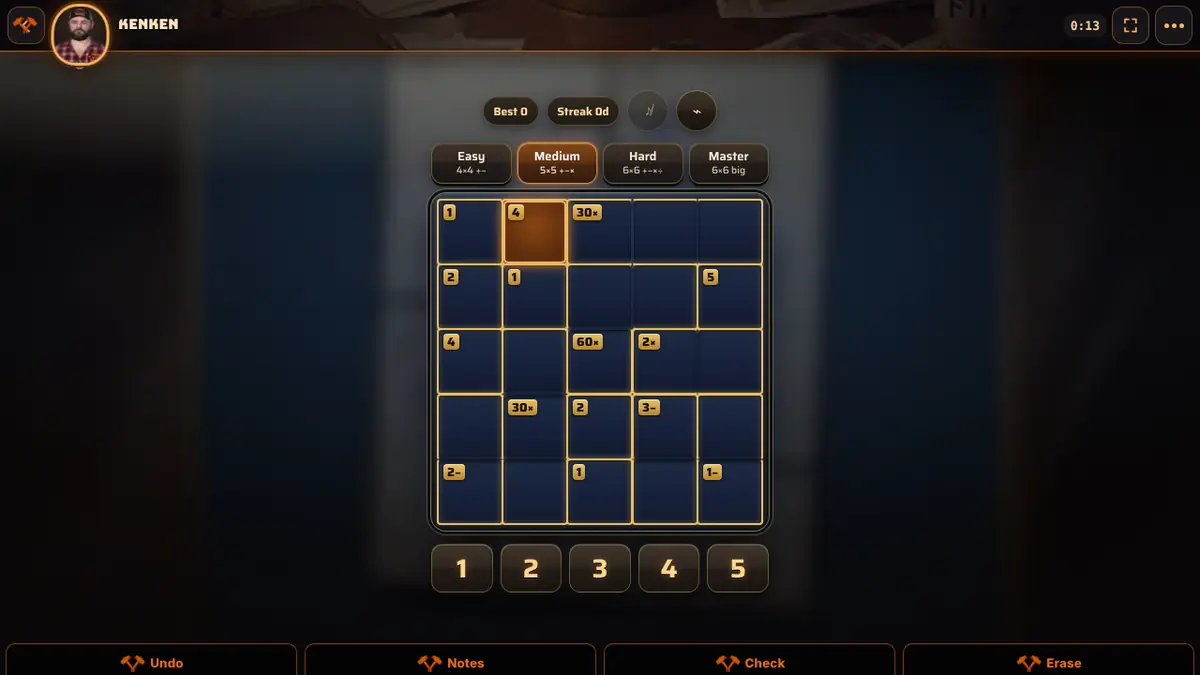
KenKen mixes the row-and-column logic of sudoku with a little arithmetic. The grid is divided into outlined cages, and each cage shows a target number and an operation. Fill the grid so no number repeats in any row or column, and make the numbers in every cage combine to its target using that operation. A cage of one square simply tells you the answer.
Each level changes the grid and the math. Easy is a 4×4 grid with addition and subtraction, Medium is 5×5 and adds multiplication, Hard is 6×6 with all four operations, and Master keeps 6×6 but grows the cages. Every puzzle is generated fresh and checked to have one solution. Notes, auto-notes that apply both the grid rules and the cage math, a Check button, optional auto-check and undo are all built in, and the game plays in your browser with no ads, pop-ups or video interruptions.
It is a good fit for sudoku fans who want a fresh angle, and for anyone who enjoys mental arithmetic without a timer pushing them along. A 4×4 Easy grid takes a couple of minutes and makes a gentle warm-up, while a 6×6 Master grid can fill a coffee break. Your grid and notes are saved on the device, so an unfinished puzzle is waiting when you come back.
How to play
- Goal: fill the grid with 1 to N (N is the grid size) so no number repeats in a row or column.
- Each cage shows a target and an operation. The numbers inside must reach that target with that operation, in any order.
- Select a square and tap a number on the pad. Turn on Notes to pencil in candidates.
- Check reports how many entries and finished cages are wrong. Auto-check turns wrong numbers red as you play.
- The puzzle is solved when every square matches the solution.
Controls
| Mouse | Click a square, then click a number on the pad. Undo, Notes, Check, Erase, Auto-notes and Auto-check are in the toolbar. |
|---|---|
| Touch | Tap a square, then tap a number on the pad. The toolbar works the same way. |
Tips
- Fill single-square cages first. Their target is the number that goes there.
- Subtraction and division cages always cover two squares, which limits the pairs a lot. On a 6×6 grid, a 3÷ cage can only hold 1 and 3 or 2 and 6.
- Every full row and column uses each number once, so a 6×6 row always adds up to 21. Use that to find the last square in a line.
- Run Auto-notes after placing a few numbers. It combines row, column and cage math, so it often reveals a square with one option.
Questions
Is there a hint button?
No. Instead, Check counts mistakes, Auto-check marks wrong numbers in red, and repeats in a row or column always show.
Which operations appear?
Easy uses addition and subtraction, Medium adds multiplication, and Hard and Master use addition, subtraction, multiplication and division.
Are there really no ads?
None at all. You will not see banner ads, video breaks or pop-ups on this page or inside the game. Forge No Ads Games is paid for by a one-time unlock, not by advertising.
Is it free?
Your first completed round of KenKen is free, and the same goes for every other game. After that, one $8 payment unlocks all 150 games for life, with no subscription.
Do I need to download anything?
No. KenKen runs in your web browser on phones, tablets and computers, so there is nothing to install.